ssh使用剪切板
参考
How to use X11 forwarding to copy from vim to local machine
tmux in practice: integration with the system clipboard
相当重要,当tmux session不好使的时候就用这个xclip gives Error: Can't open display: localhost:10.0 in tmux session in Ubuntu VirtualBox VM
主要步骤
- 在本地机(local)上安装x11 forwarding的软件,macOS可以用XQuartz,Windows上的选择更多。并配置好(如macOS的就需要配置剪切板转发)
- 在远程机(remote server)上安装xclip,以及支持clipboard的vim版本(vim-gtk,或者neovim),使用时黏贴到
*寄存器即可。 - ssh连接时开启x11 forwarding
- (optional)配置tmux copy模式相关的指令
1. 安装x11 forwarding的软件并配置
以macOS为例。参考这个回答 https://stackoverflow.com/a/51143258
- Open XQuartz.app
- In Preferences > Pasteboard, uncheck “enable syncing”
- Close preferences, open it again, and recheck “enable syncing”
2. 下载xclip和支持clipboard的vim,配置vim
xclip和vim-gtk直接apt安装即可。这里重点关注vim的配置
参考https://vi.stackexchange.com/a/96
主要就是配置成快捷键,会比较方便
noremap <Leader>y "*y
noremap <Leader>p "*p
noremap <Leader>Y "+y
noremap <Leader>P "+p
注意,Spacevim中默认的leader key + p /P 已经被绑定了额外的功能
3. ssh连接时开启x forwarding
主要就是:
# -X表示开启X forwarding,-Y表示yes
ssh -XY user@ip
4. tmux也开启粘贴到clipboard
bind -T copy-mode-vi Enter send-keys -X copy-pipe-and-cancel "xclip -i -f -selection primary | xclip -i -selection clipboard"5. 可能的问题
clipboard: error invoking xclip: Error: Can’t open display: localhost:12.0
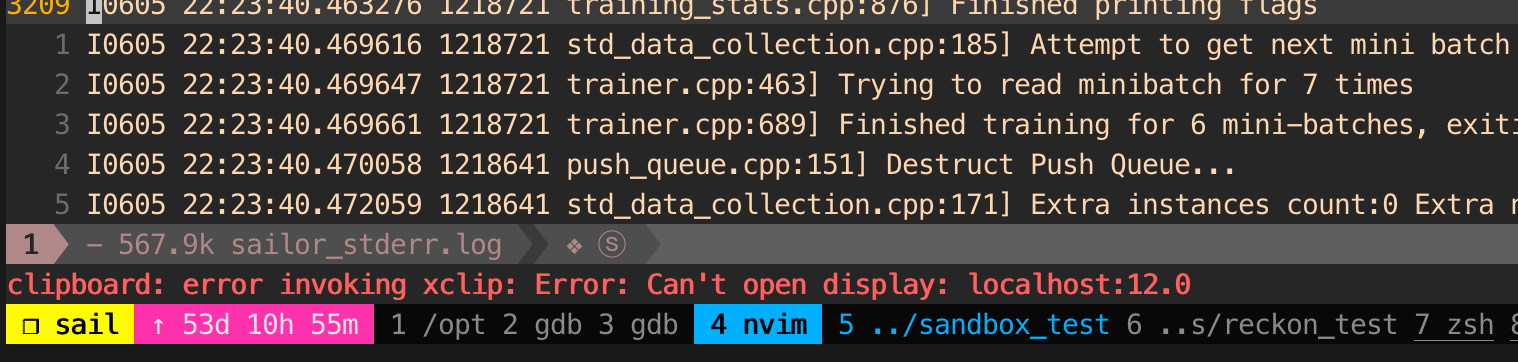
参考 xclip gives Error: Can't open display: localhost:10.0 in tmux session in Ubuntu VirtualBox VM
需要关闭tmux session然后重开
20200702 update
- 将DISPLAY变量设为固定值
export DISPLAY="localhost:10.0"- 添加ForwardX11Trusted并修改 ForwardX11Timeout为更大的值(更长的时间)
X11 forwarding stops working after a while
Host *
    ForwardX12Timeout 2d
    ForwardX11Trusted yes
All articles in this blog are licensed under CC BY-NC-SA 4.0 unless stating additionally.